



You’re working 50, 60, maybe even 70 hours a week. You started your business for freedom, but somewhere along the way, the business started owning you.
Your calendar is a mess of back-and-forth scheduling emails. Your inbox is overflowing with messages that need responses. Your content feels like it takes forever to create. And at the end of every week, you collapse into the weekend wondering where the time went—and whether this is sustainable.
Here’s what this unsustainable pace costs you:
You know AI could help. You’ve seen the headlines, heard the buzz. But every time you try to figure it out, you’re faced with dozens of tools, conflicting reviews, and the sinking feeling that testing them all would take more time than you have.
I’ve been there. I was working 60-hour weeks, drowning in manual tasks, convinced that AI was too complicated or not worth the learning curve. Then I discovered the 5 tools I’m about to share with you. They didn’t just save me time—they gave me back my life.
In this post, I’m giving you exactly what I wish someone had given me: 5 specific AI tools that deliver measurable time savings. No list of 50 tools to test. No complex setups. Just the tools that consistently save 10+ hours a week for real business owners.
You don’t need to be techy. You don’t need to code. You just need 30 minutes to set up each tool. Let’s get your time back.

Soft Gate: Get Your 10-Hour Time-Saver Toolkit
Before we dive into the 5 tools, I want to give you a resource that makes this immediately actionable. I’ve created a free 10-Hour Time-Saver Toolkit that includes step-by-step setup guides for all 5 tools with actual screenshots, plus a 30-day adoption checklist.
It’s the exact system I use to help overwhelmed business owners go from burnout to balance.
[Click here to grab your free 10-Hour Time-Saver Toolkit.]
How These 5 Tools Were Chosen
I didn’t just pick popular tools. Every tool on this list was selected based on four criteria:
| Criterion | What It Means |
|---|---|
| Proven Time Savings | Each tool saves at least 2–3 hours per week. Some save 5–8. |
| Beginner-Friendly | No coding, no complex setup. If you can use Gmail, you can use these. |
| Free or Low-Cost | Every tool has a free tier that’s powerful enough to start saving time immediately. |
| Real-World Tested | These aren’t obscure tools. Thousands of business owners use them to reclaim their time. |
You don’t need all 5 to save 10+ hours. Pick 2–3 that match your biggest time-sucks, and you’ll see the difference within weeks.

Tool #1: Calendly – Save 2–3 Hours/Week
The Problem:
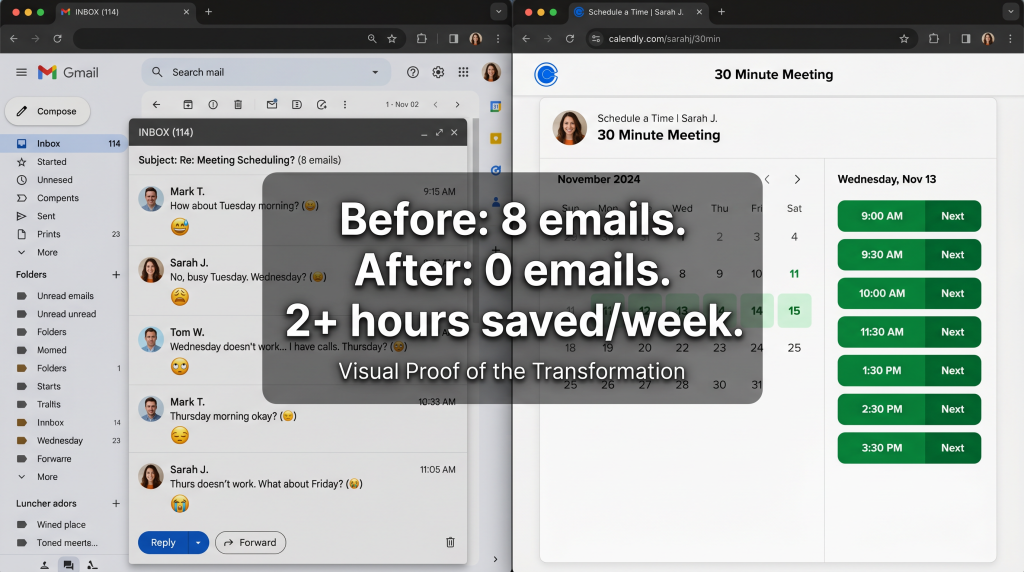
You know the drill. Someone wants to meet. You email: “How about Tuesday at 2pm?” They reply: “Can’t do Tuesday. Wednesday at 10am?” You reply: “Wednesday at 10am works.” Three days. Six emails. One meeting scheduled.
Multiply that by 5–10 meetings a week, and you’re spending hours just coordinating calendars.
What Calendly Does:
Calendly automates meeting scheduling. You share a link. People see your available times and book themselves. No back-and-forth. No emails.
The Time Savings:
How to Set It Up (15 minutes):
1. Go to Calendly.com and sign up for free
2. Connect your Google Calendar or iCloud
3. Set your available hours (e.g., Tuesday/Thursday 10am–4pm, 30-minute meetings)
4. Copy your unique link: calendly.com/yourname
5. Paste it in your email signature, website, and social bio
Pro Tip: Set up different event types for different meetings (sales calls, client check-ins, discovery calls). Each gets its own link.
Tool #2: ChatGPT – Save 5–8 Hours/Week
The Problem:
You spend hours writing emails, drafting content, brainstorming ideas, researching topics, and crafting proposals. Every piece of writing takes longer than it should.
What ChatGPT Does:
ChatGPT is an AI writing assistant that can draft anything—emails, social captions, blog posts, proposals, research summaries—in seconds. You refine; it does the heavy lifting.
The Time Savings:
How to Use It Effectively (10 minutes setup):
1. Go to chat.openai.com and sign up for free
2. Start with this formula: “I run a [business type]. My audience is [audience]. Write a [type of content] about [topic] in a [tone] tone.”
Examples:
Pro Tip: Use the free tier. It’s powerful enough for most needs. Upgrade to Plus ($20/month) only when you hit limits.
Who It’s For: Anyone who writes anything for their business. That’s everyone.
Tool #3: Canva (with Magic Studio) – Save 3–5 Hours/Week
The Problem:
You’re not a designer. But you need social graphics, presentations, thumbnails, and marketing materials. You either spend hours trying to make something decent, or you pay a designer and wait days for deliverables.
What Canva Does:
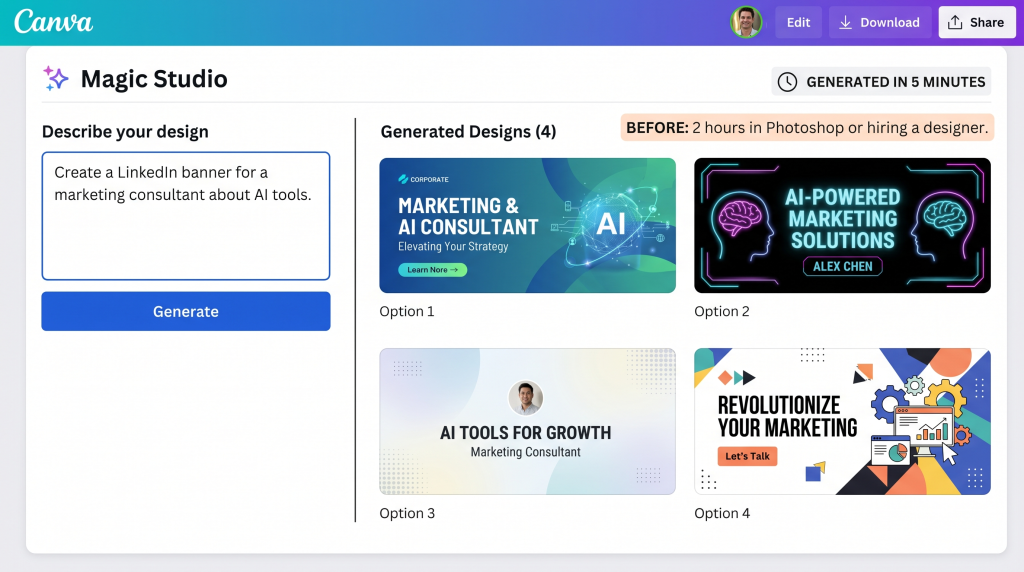
Canva is a design platform. Its Magic Studio AI features let you generate complete designs from text prompts. Type what you need; AI creates options. You customize in minutes.
The Time Savings:
How to Use It (10 minutes setup):
1. Go to canva.com and sign up for free
2. Click “Magic Studio” (sparkle icon)
3. Type what you need: “Create an Instagram post for a coaching business about overcoming procrastination”
4. Pick from AI-generated options
5. Customize colors and text to match your brand
Pro Tip: Create a brand kit (free with Canva account) with your colors, fonts, and logo. AI will automatically use them in generated designs.
Tool #4: Opus Clip – Save 3–5 Hours/Week (Per Video)
The Problem:
You create video content—YouTube videos, webinars, podcasts—but you’re not repurposing them for social media because editing clips takes hours. Or you’re spending those hours manually cutting clips and adding captions.
What Opus Clip Does:
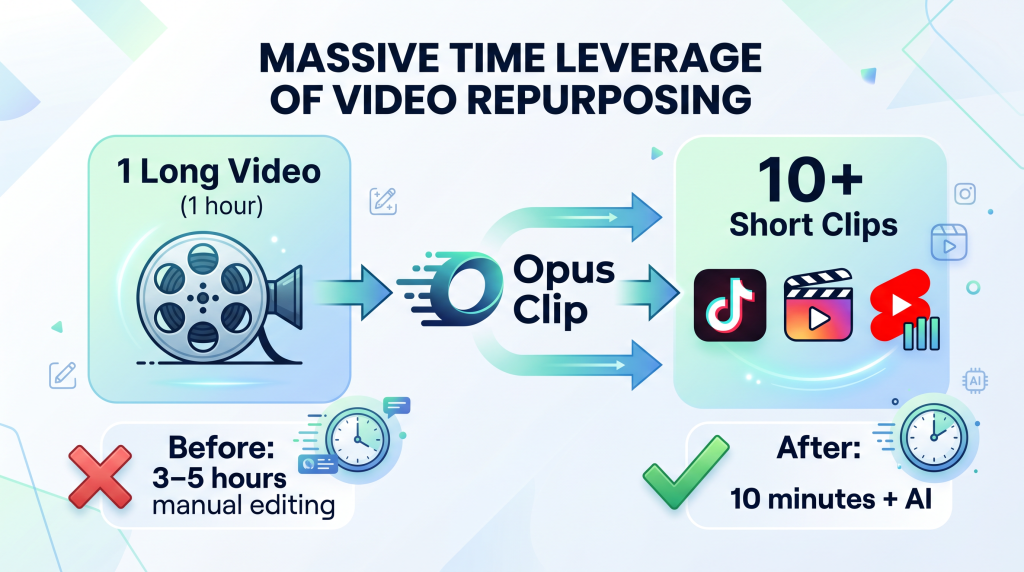
Opus Clip is AI that automatically repurposes long-form video into short, viral-ready clips for TikTok, Instagram Reels, and YouTube Shorts. It identifies the most engaging moments, adds captions, and creates clips with hooks.
The Time Savings:
How to Use It (10 minutes setup):
1. Go to opus.pro and sign up for free (60 minutes/month free)
2. Upload your YouTube video, Zoom recording, or podcast episode
3. AI analyzes the video, finds engaging moments, and creates clips
4. Download clips with auto-generated captions
5. Post to TikTok, Instagram Reels, YouTube Shorts
Pro Tip: For best results, use videos where you’re teaching something, telling a story, or sharing a strong opinion. Those generate the best clips.
Tool #5: Zapier (Free Tier) – Save 2–4 Hours/Week
The Problem:
You use multiple tools—Calendly, email marketing, spreadsheets, CRMs—and you’re constantly copying data between them manually. A new customer signs up, and you manually add them to your email list, your spreadsheet, and your project management tool. Every time.
What Zapier Does:
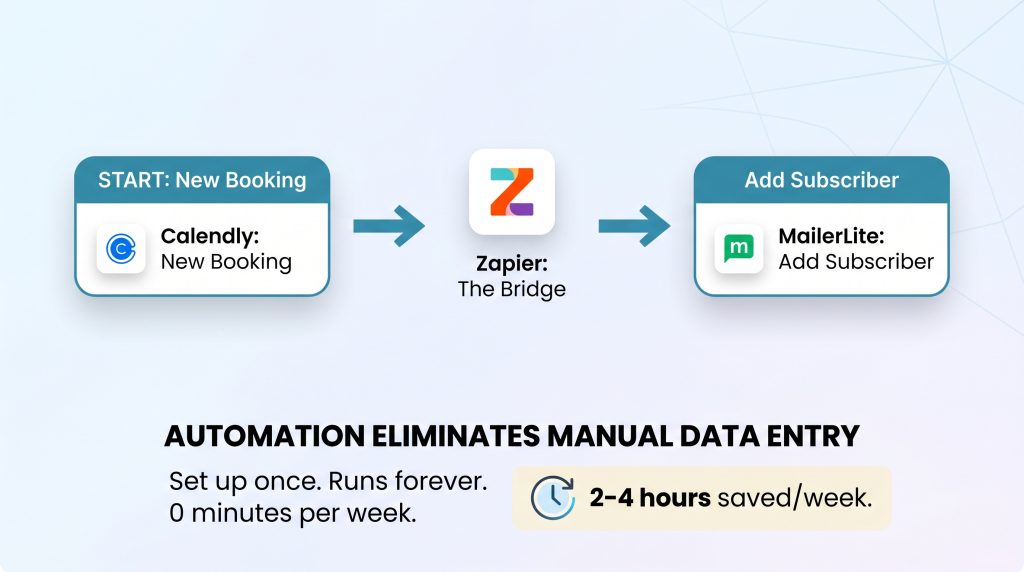
Zapier connects your apps. When something happens in one app (a new Calendly booking), Zapier automatically triggers an action in another app (add them to your email list).
The Time Savings:
Simple Automations to Start With (15 minutes setup):
1. Go to zapier.com and sign up for free (100 tasks/month free)
2. Click “Create Zap”
3. Choose a trigger app and event:
4. Connect your accounts. Test. Turn it on.
Pro Tip: Start with ONE automation. Master it. Then add another. You don’t need to automate everything at once.
The 10+ Hour Math
Here’s how these tools add up. You don’t need all five to save 10+ hours. Pick the ones that match your biggest time-sucks.
| Tool | Time Saved/Week | Best For |
|---|---|---|
| Calendly | 2–3 hours | Anyone with meetings |
| ChatGPT | 5–8 hours | Anyone who writes |
| Canva | 3–5 hours | Anyone creating visuals |
| Opus Clip | 3–5 hours per video | Video creators |
| Zapier | 2–4 hours | Anyone using multiple tools |
| Total | 15–25 hours/week |
The bottom line: Even if you only implement 2–3 of these tools, you’re saving 10+ hours a week. That’s a full day back. Every week.
How to Start (Without Overwhelm)
You don’t need to set up all 5 this week. Here’s a realistic 30-day plan.
| Week | Focus | Time Investment | Time Saved by End of Week |
|---|---|---|---|
| Week 1 | Calendly | 15 minutes | 2–3 hours |
| Week 2 | ChatGPT | 10 minutes + practice | 5–8 hours |
| Week 3 | Canva | 10 minutes + practice | 3–5 hours |
| Week 4 | Pick one: Opus Clip OR Zapier | 15 minutes | 2–5 hours |
Result: By Day 30, you’ve saved 10+ hours a week. That’s 40+ hours a month. 500+ hours a year.
The “I Don’t Have Time to Set Up Tools” Objection
I hear this constantly. It’s the most common reason busy business owners stay stuck.
Here’s the truth: 30 minutes of setup saves you 10+ hours every week.
That’s a 20x–60x return on your time investment.
The 30 minutes you spend setting up Calendly will save you 100+ hours this year. The only thing standing between you and those hours is 30 minutes.
Start with one tool. Don’t try to do all five at once.
You now have 5 tools that will save you 10+ hours a week, a 30-day adoption plan, and a clear understanding of how much time each tool saves.
But knowing the tools and actually setting them up are two different things. That’s why I created a resource to walk you through every step.
Get Your Free 10-Hour Time-Saver Toolkit (Benefit-Focused)
Problem Recap: You’re working 50+ hour weeks, drowning in manual tasks, and you know AI could help—but you don’t have time to test dozens of tools to find what works.
Solution: I’ve created a free 10-Hour Time-Saver Toolkit that takes these 5 tools and turns them into done-with-you setup guides. Inside, you’ll get:
This isn’t a list of tools. It’s a system to actually implement them and start saving time this week.
Action: Every week you delay is another 10+ hours you could have back. Click the button below, grab your free Toolkit, and set up your first tool today.
[Get Your Free 10-Hour Time-Saver Toolkit →]
P.S.
Here’s the truth about AI tools: they’re not magic. But they are the closest thing to it when it comes to getting your time back. 30 minutes of setup. 10+ hours back every week. That’s a trade you’d make in any other area of your life. The only question is whether you’ll make it today. Your Toolkit is waiting. Start with Calendly tonight.
30 minutes of setup. 10+ hours back every week. That’s a 20x return on your time.
Aslam Ssonko