

You’ve heard the name everywhere. HubSpot. The “gold standard” of CRM and marketing automation. The tool that growing businesses swear by.
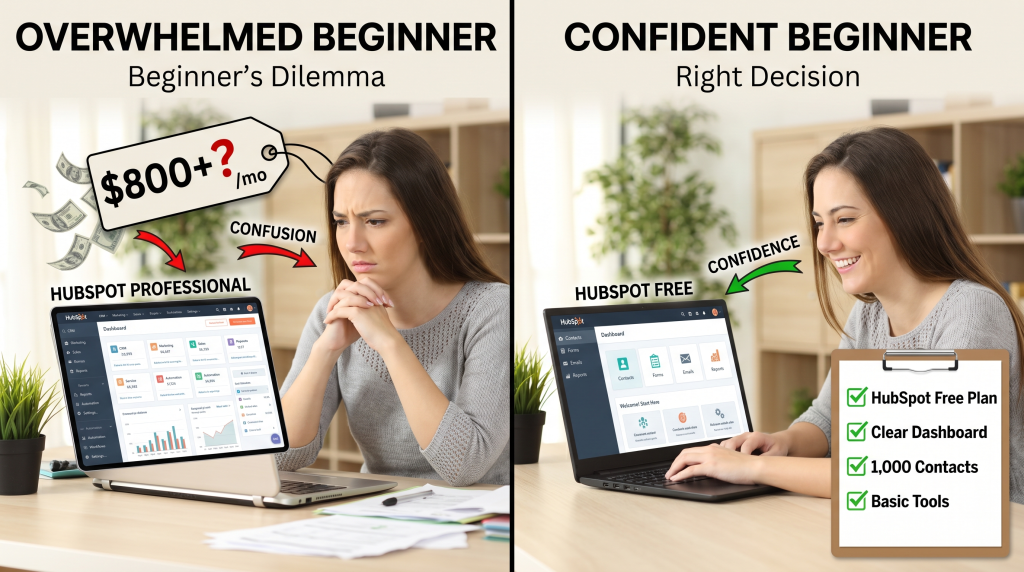
But you’re not a growing business. You’re a beginner. You have maybe a handful of contacts. You’re not running complex marketing campaigns. You’re not managing a sales team. And when you look at HubSpot’s pricing page, your eyes widen at the $800/month price tags on the professional tiers.
So you’re stuck. You want to start with the right tool—one you won’t outgrow in six months. But you don’t want to pay for features you’ll never use. And you’re worried HubSpot will be too complex, too expensive, and frankly, too much for where you are now.
I’ve been there. When I started my first business, I spent weeks agonizing over which CRM to choose. I was terrified of picking the wrong tool and either wasting money or having to migrate everything later.
In this review, I’m going to give you an honest, beginner-focused answer to the question: Is HubSpot worth it for beginners? I’ll cover what’s actually free, where the paid tiers start, who HubSpot is right for, and who should look elsewhere. No hype. No affiliate bias. Just the truth to help you make the right decision for your business.
Soft Gate: Get Your HubSpot for Beginners Decision Guide
Before we dive into the full review, I want to give you a tool that makes this decision easier. I’ve created a free HubSpot for Beginners Decision Guide that includes the 4-week starter plan, a free tier feature checklist, and a HubSpot vs. Alternatives comparison worksheet.
It’s the exact framework I use to help beginners decide whether HubSpot is right for them.
[Click here to grab your free HubSpot for Beginners Decision Guide.]
What Is HubSpot? (For Beginners)
Let’s start with the basics. In plain English, HubSpot is an all-in-one platform that helps businesses:
| Function | What It Does |
|---|---|
| Manage contacts | CRM (Customer Relationship Management) – track leads, customers, deals |
| Send marketing emails | Email marketing, forms, landing pages |
| Track sales | Sales pipeline, meeting scheduling, quotes |
| Provide support | Ticketing, knowledge base, live chat |
The key thing for beginners: HubSpot has a genuinely useful free tier. It’s not a 14-day trial. It’s not a “demo” that expires. It’s a permanent free version that includes the core CRM, email marketing (up to 2,000 emails/month), forms, live chat, and basic reporting.
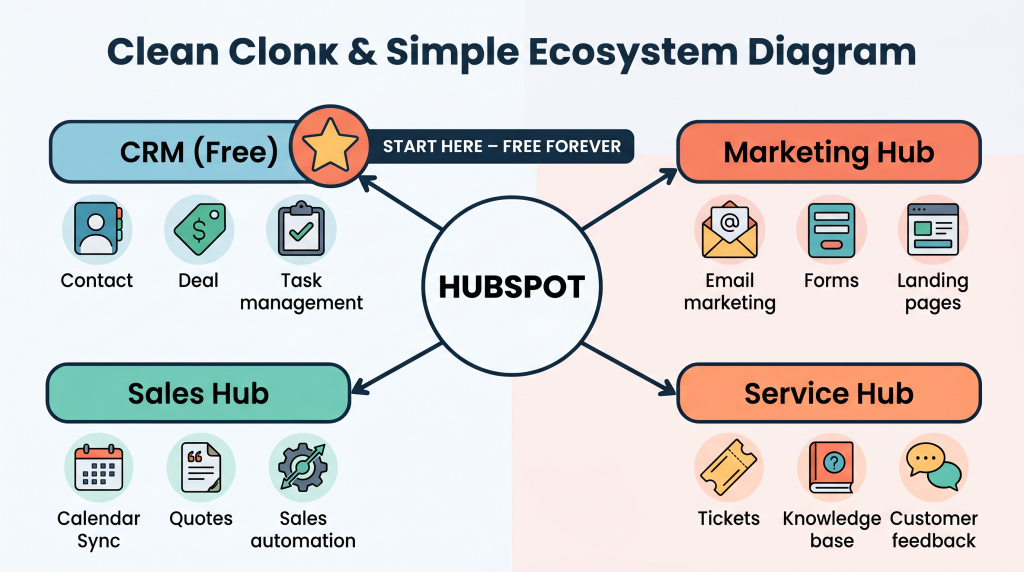
The HubSpot ecosystem at a glance:
For beginners, the free CRM is where you’ll spend most of your time. And it’s genuinely powerful.
What’s Actually Free? (The Beginner-Friendly Tier)
Let’s get specific. Here’s exactly what you get with HubSpot’s free tier—no credit card required.
| Feature | Free Tier Details |
|---|---|
| Contacts | Unlimited (yes, unlimited contacts) |
| Email Marketing | Up to 2,000 emails/month (enough for most beginners) |
| CRM | Full CRM with contact management, deal stages, tasks, notes |
| Forms | Unlimited forms, up to 1,000 submissions/month |
| Live Chat | Basic live chat on your website |
| Meeting Scheduling | Basic scheduling (similar to Calendly) |
| Reporting | Basic dashboards and reports |
| Users | Up to 5 users (great for small teams) |
| Support | Community support and knowledge base |
What’s NOT included in free:
| Missing Feature | What It Means |
|---|---|
| Advanced email automation | No sequences, workflows, or triggered emails beyond welcome series |
| Custom branding | HubSpot branding appears on forms and emails |
| A/B testing | Can’t test different subject lines or content |
| Advanced reporting | Limited to basic dashboards |
| Phone support | Community and email support only |
| Landing pages | Can’t build landing pages (forms yes, pages no) |
Key insight: The free tier is genuinely useful for beginners. You can run a real business on it without paying a dime. You’re not crippled. You’re not limited to 100 contacts. You get the core functionality you need to start.
The Pros: Why Beginners Love HubSpot
Pro #1: The Free Tier Is Actually Useful
Unlike many “free trials” that expire or limit you to 100 contacts, HubSpot’s free tier is permanent and generous. Unlimited contacts alone is huge—most competitors cap free tiers at 500–1,000 contacts. You can build a real business without paying.
Pro #2: All-in-One Simplicity
Your CRM, email, forms, chat, and meeting links are all in one place. No juggling 5 different tools. No copying data between spreadsheets and email platforms. Everything is connected automatically.
Pro #3: Beginner-Friendly Interface
The interface is clean and modern. HubSpot walks you through setup with step-by-step guides. There’s a reason millions of beginners start here—it’s designed to be approachable.
Pro #4: Scales With You
Start free. Add features as you grow. When you’re ready to upgrade, your data and workflows are already in place. No painful migration later. No rebuilding your systems from scratch.
Pro #5: HubSpot Academy (Free Education)
World-class free courses on CRM, marketing, sales, and business fundamentals. You learn the tool AND how to run your business better. The certifications are legitimately valuable.
The Cons: Where Beginners Might Struggle
Con #1: Can Feel Overwhelming at First
HubSpot does a lot. The dashboard has many options. Beginners may feel lost initially (though the free academy helps). If you’re someone who gets overwhelmed by complex interfaces, start with just one feature at a time.
Con #2: Paid Tiers Get Expensive Fast
| Tier | Monthly Price | What You Get |
|---|---|---|
| Free | $0 | CRM, 2,000 emails/month, basic features |
| Starter | $20–$45/month | Removes HubSpot branding, basic automation |
| Professional | $450–$800/month | Full automation, sequences, reporting |
| Enterprise | $1,500+/month | Advanced features for large teams |
The jump from free to paid is significant. If you need advanced automation now, HubSpot’s paid tiers may be out of reach for a beginner budget.
Con #3: Email Marketing Limits on Free Tier
2,000 emails/month is generous, but you’ll outgrow it as your list grows. Also, no automation sequences on free tier—you can’t send triggered emails beyond a simple welcome series.
Con #4: Some Features Are “HubSpot-First”
Once you build in HubSpot, migrating to another platform is difficult. You’re making a commitment to their ecosystem. If you’re not sure you’ll stay with HubSpot long-term, this is worth considering.
Who Is HubSpot Right For? (The Beginner Personas)
Perfect Fit:
| Persona | Why It Works |
|---|---|
| The Solopreneur | Running a service business (coaching, consulting, freelancing). Needs to track leads, send follow-up emails, and manage a few deals. Free tier covers everything. |
| The Content Creator | Building an audience. Needs forms to capture email signups, basic email marketing, and a CRM to track subscribers. Free tier handles it. |
| The Early-Stage Startup | Small team (2–5 people). Wants one tool for CRM, email, and sales tracking instead of managing 5 separate subscriptions. Free tier works until you need advanced features. |
| The Future-Thinker | Knows they’ll scale and wants to start on a platform that grows with them. Prefers to learn one tool deeply rather than migrate later. |
Maybe Not for You:
| Persona | Why to Skip |
|---|---|
| The Extremely Budget-Constrained | If you need automation now (sequences, workflows), HubSpot’s paid tiers are expensive. Consider MailerLite + Calendly + a simple spreadsheet instead. |
| The Simplicity-Seeker | If you get overwhelmed by dashboards and want the simplest possible setup, a dedicated email tool like MailerLite or Flodesk might be better. |
| The E-commerce Only | If you only sell physical products, your e-commerce platform (Shopify, WooCommerce) likely has built-in CRM and email tools that are simpler. |
HubSpot vs. Alternatives for Beginners
Here’s how HubSpot stacks up against other beginner-friendly tools:
| Tool | Free Tier | Best For | HubSpot Advantage |
|---|---|---|---|
| HubSpot | Unlimited contacts, 2,000 emails/month | All-in-one, scaling businesses | Everything connected in one place |
| MailerLite | 1,000 subscribers, unlimited emails | Email-focused beginners | Simpler interface, cheaper paid tiers |
| Brevo (Sendinblue) | Unlimited contacts, 300 emails/day | Email + SMS | Very generous free email limit |
| Zoho CRM | Free for 3 users | Simple CRM only | Good if you only need CRM, not marketing |
| Less Annoying CRM | No free tier | Simple CRM for solopreneurs | Simpler, but paid from day one |
Key insight: If you need CRM + email marketing + forms + live chat in one place, HubSpot’s free tier is unmatched. If you only need email marketing, a dedicated email tool may be simpler and cheaper to upgrade later.
The Beginner’s HubSpot Starter Plan
If you decide to try HubSpot, here’s how to start without overwhelm. Don’t try to use every feature at once.
| Week | Focus | Action |
|---|---|---|
| Week 1 | Set up CRM | Import your contacts (or add a few manually). Create deal stages that match your sales process. Add your first deals. |
| Week 2 | Set up forms | Create a simple lead capture form. Embed it on your website or share the link. Test it by signing up yourself. |
| Week 3 | Set up email | Create a welcome email. Send it manually to new contacts to start. Learn the email editor. |
| Week 4 | Explore Academy | Take HubSpot Academy’s free CRM certification course. Learn the features you’ll use next. |
Pro tip: Don’t try to use Marketing Hub, Sales Hub, and Service Hub all at once. Start with CRM + forms + basic email. Add features as you need them.
The “I’m Not Ready Yet” Objection
I hear this from beginners all the time: “I don’t have enough contacts yet. I’m not ready for a real CRM.”
Let me reframe this:
You don’t need to commit. The free tier is permanent. Try it with no risk.
You can sign up today, add your 5 contacts, create one deal, send one email. See how it feels. If you like it, you’ve built your foundation. If you don’t, you’ve lost nothing but an hour.
You don’t need to use all features. Start with just the CRM. Ignore the marketing hub. Ignore the service hub. Just use it as a contact database and deal tracker. That alone is valuable.
If you outgrow it, you’ll be making revenue by then. Upgrades become business expenses, not personal costs. The worst case is you grow enough to afford the paid tier. That’s a good problem to have.
Reframe: “The best time to start with HubSpot is when you’re small. Learning the tool as you grow is easier than migrating later.”
Final Verdict: Is HubSpot Worth It for Beginners?
Bottom Line:
Yes, if:
Skip it if:
My Recommendation:
Start with HubSpot’s free tier. Set up just the CRM and one form. Send a few emails. See how it feels. Use HubSpot Academy to learn the basics.
If it clicks, you’ve built your foundation on a platform that will scale with you for years. If it feels like too much, you’ve lost nothing but a few hours of setup time—and you know more about what you need from a CRM.
The free tier is genuinely useful. You can run a real business on it without paying a dime. That’s the safest way to answer the question for yourself.
You now have an honest review of HubSpot for beginners: what’s free, what costs money, who it’s right for, and a starter plan to try it without overwhelm.
But knowing the facts and actually setting up HubSpot are two different things. That’s why I created a resource to guide you through the first steps.
Get Your Free HubSpot for Beginners Decision Guide (Benefit-Focused)
Problem Recap: You’re a beginner trying to decide if HubSpot is worth it. You don’t want to waste money on the wrong tool, but you don’t want to outgrow a tool too quickly either.
Solution: I’ve created a free HubSpot for Beginners Decision Guide that takes this review and turns it into an actionable decision tool. Inside, you’ll get:
Action: The only way to know if HubSpot is right for you is to try it. Free tier. One hour. No risk. Click the button below, grab your Decision Guide, and take the first step.
[Get Your Free HubSpot for Beginners Decision Guide →]
P.S.
Here’s the truth about choosing business tools: analysis paralysis is expensive. You’ll never know if a tool is right for you until you try it. HubSpot’s free tier exists for exactly this reason. Sign up. Add one contact. Send one email. You’ll know more in an hour than weeks of reading reviews. Your Decision Guide is waiting. Start today.
The only way to know if HubSpot is right for you is to try it. Free tier. One hour. No risk.
Aslam Ssonko