


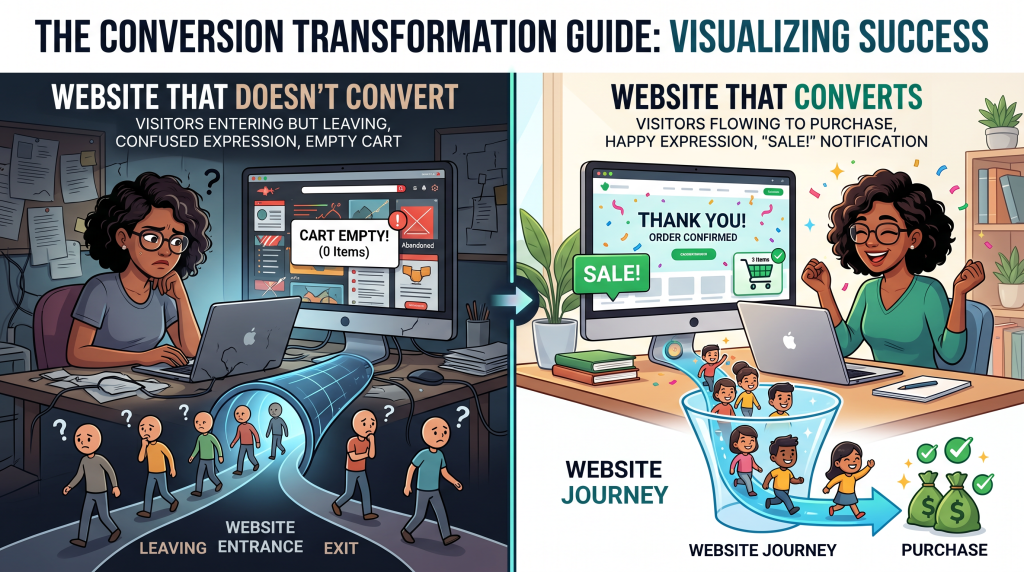
You built a website. You’re proud of it. It looks good, it explains what you do, and you’re ready to start making sales.
But nobody’s buying.
You check your analytics. Visitors are coming—but they’re leaving. You’ve put time and money into building your site, but it’s not working. You’re frustrated, confused, and wondering what you’re doing wrong.
I’ve been there. I built my first website and waited for sales to magically appear. Nothing. Then I discovered something simple: a website that looks good isn’t the same as a website that sells.
In this guide, I’m going to walk you through exactly how to build a website that converts visitors into buyers. No technical jargon. No complicated code. Just simple, proven principles that turn browsers into customers.
By the end, you’ll have a clear checklist to transform your site—and start making sales.
Soft Gate: Get Your Conversion Checklist
Before we dive into the elements, I want to give you a tool that makes this transformation easier. I’ve created a free Conversion Checklist that includes the 5-page structure template, trust-building guide, and website audit worksheet.
It’s the exact system I use to turn websites into sales machines.
[Click here to grab your free Conversion Checklist.]
The 5 Elements of a Converting Website
Websites that sell have five things in common. Without them, visitors leave. With them, visitors buy.
The Simple Formula:
| Element | What It Does |
|---|---|
| 1. Clarity | Visitors understand what you offer in seconds |
| 2. Trust | Visitors feel safe buying from you |
| 3. Value | Visitors see why your offer is worth it |
| 4. Urgency | Visitors feel motivated to buy now |
| 5. Simplicity | Visitors can buy without confusion |
Here’s what happens when they’re missing:
Your job: Make sure all five are on your site.
Element #1: Clarity (What Do You Offer?)
The 5-Second Test:
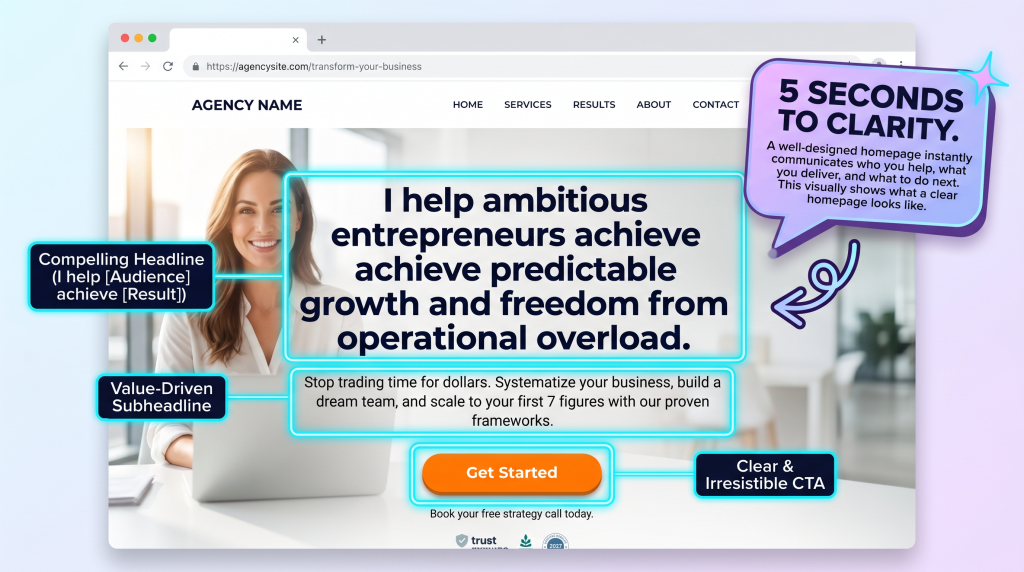
A visitor should understand what you offer within 5 seconds of landing on your site. If they don’t, they leave.
Your Homepage Must Answer:
| Question | How to Answer |
|---|---|
| What do you sell? | One clear sentence at the top |
| Who is it for? | Mention your target audience |
| What problem does it solve? | Describe the pain point |
| What’s the next step? | Clear button telling them what to do |
Good Headline Formula:
“I help [audience] achieve [result] without [pain point].”
Examples:
Bad Headline Examples:
Your Task: Write your homepage headline. Does it pass the 5-second test?
Element #2: Trust (Why Should They Buy from You?)
People buy from people and businesses they trust. If your site feels sketchy, they leave.
Trust Elements to Add:
| Element | How to Add It |
|---|---|
| Testimonials | Quotes from happy customers with photos and names |
| Social Proof | Number of customers, sales, or years in business |
| Media Mentions | Logos of websites that featured you |
| Money-Back Guarantee | Promise that removes risk |
| About Page | Your story, face, and why you do this |
| Contact Info | Email, phone, or physical address |
| Security Badges | SSL certificate, payment logos |
How to Get Testimonials (If You Have None):
| Method | How to Do It |
|---|---|
| Ask Past Clients | “Would you mind writing a few sentences about your experience?” |
| Offer Free Product | Give free product to a few people in exchange for testimonial |
| Use Friends | Ask friends to share their honest thoughts |
| Use AI Draft | Ask ChatGPT to draft testimonial requests |
Your Task: Add at least 2 testimonials to your site this week.
Element #3: Value (Why Is Your Offer Worth It?)
Visitors need to see the value before they buy. If they don’t understand what they’re getting, they don’t buy.
Value-Adding Elements:
| Element | What to Include |
|---|---|
| Benefits (Not Features) | What they’ll get, not just what it is |
| Results | Specific outcomes they can expect |
| Comparison | How you’re different/better |
| Visuals | Screenshots, mockups, examples |
| What’s Included | Clear list of what they receive |
Feature vs Benefit:
| Feature | Benefit |
|---|---|
| 10 video lessons | “Learn at your own pace with clear, step-by-step videos” |
| Lifetime access | “Buy once, access forever. No subscription fees.” |
| PDF worksheets | “Apply what you learn with actionable worksheets” |
| Email support | “Get help when you’re stuck—no waiting” |
How to Write Benefits:
Example:
Your Task: Review your product page. Turn features into benefits.
Element #4: Urgency (Why Buy Now?)
Without urgency, visitors leave to “think about it”—and never come back. Give them a reason to buy today.
Urgency Elements (Ethical):
| Element | Example |
|---|---|
| Limited Time | “Offer ends Friday” |
| Limited Quantity | “Only 20 spots available” |
| Bonus | “Free bonus for first 10 buyers” |
| Price Increase | “Price goes up in 3 days” |
| Waitlist | “Join the waitlist for next launch” |
| Early Bird | “50% off for first 50 customers” |
Don’t Fake Urgency:
Your Task: Add one urgency element to your offer page.
Element #5: Simplicity (Is It Easy to Buy?)
Every click, every field, every step loses customers. Make buying as easy as possible.
The Simplicity Checklist:
| Element | Check |
|---|---|
| Clear button | “Buy Now” not “Submit” or “Send” |
| Above the fold | Button visible without scrolling |
| No distractions | Remove sidebar, extra links, navigation |
| Few form fields | Name and email only (not address, phone, company) |
| Multiple payment options | Credit card + PayPal |
| Mobile-friendly | Works on phones, buttons easy to tap |
| No pop-ups | Don’t interrupt checkout |
The 3-Click Rule:
A visitor should be able to buy in 3 clicks from any page.
Test Your Checkout:
1. Go to your site
2. Click “Buy Now”
3. Count how many clicks to purchase
4. If it’s more than 3, simplify
Your Task: Test your checkout process. Can you buy in 3 clicks?
The 5-Page Website Structure for Conversions
You don’t need 50 pages. You need these 5 pages. Each has one job.
| Page | Purpose | Must-Have Elements |
|---|---|---|
| Homepage | Hook visitors, explain offer | Clear headline, subheadline, CTA button |
| Product/Services | Detail what you sell | Features, benefits, testimonials, price, CTA |
| About | Build trust, tell story | Your photo, story, why you do this |
| Contact | Easy way to reach you | Email address, maybe simple form |
| Checkout | Make it easy to buy | Few fields, clear CTA, security badges |
Optional Pages:
Your Task: Do you have all 5 pages? If not, add the missing ones this week.
The Complete Conversion Checklist
Use this checklist to audit your site. One checkmark at a time.
| Element | Done? |
|---|---|
| Clarity | |
| Clear headline (5-second test) | ☐ |
| One clear call-to-action | ☐ |
| Tells who it’s for | ☐ |
| Tells what problem it solves | ☐ |
| Trust | |
| At least 2 testimonials with names/photos | ☐ |
| Money-back guarantee | ☐ |
| About page with your photo | ☐ |
| Contact info visible | ☐ |
| Value | |
| Benefits listed (not just features) | ☐ |
| Specific results mentioned | ☐ |
| Visuals (screenshots, mockups) | ☐ |
| Urgency | |
| Reason to buy now | ☐ |
| Bonus or limited offer | ☐ |
| Price increase or limited time | ☐ |
| Simplicity | |
| Button visible above fold | ☐ |
| Checkout has 3–5 fields max | ☐ |
| Mobile-friendly (test on phone) | ☐ |
| No pop-ups during checkout | ☐ |
| Test | |
| Tested checkout on phone | ☐ |
| Tested checkout on computer | ☐ |
| Asked someone else to test | ☐ |
The 30-Day Website Conversion Plan
You don’t need to fix everything at once. Here’s a simple 4-week plan.
| Week | Focus | Action |
|---|---|---|
| Week 1 | Clarity + Structure | Write clear headline, ensure 5 essential pages exist |
| Week 2 | Trust + Value | Add 2 testimonials, turn features into benefits |
| Week 3 | Urgency + Simplicity | Add one urgency element, simplify checkout |
| Week 4 | Test + Optimize | Test on phone, test checkout, ask for feedback |
| Result | Higher Conversion Rate | More visitors become buyers |
The “I Don’t Have Testimonials” Objection
This is the #1 thing that stops beginners. Let me address it directly.
Even one testimonial is better than none.
How to Get Your First Testimonial:
| Method | How to Do It |
|---|---|
| Ask a Friend | “I’m launching [product]. Would you try it and share honest feedback?” |
| Offer Free Product | Give free product to 3–5 people in exchange for testimonial |
| Ask Past Clients | If you’ve helped anyone before, ask them |
| Use a Draft | “Here’s what I imagine a customer might say. Does this resonate?” |
If you have no customers yet:
Reframe: “Even one testimonial builds trust. Start with one. Add more as you sell.”
The “I Don’t Have a Designer” Objection
You don’t need a designer. Simple and clear beats fancy and confusing.
Simple Design Wins:
Reframe: “A simple site with great copy converts better than a beautiful site with confusing copy.”
You now have the 5 elements of a converting website, a complete checklist, a 30-day plan, and answers to common objections.
But reading the guide is one thing. Applying the checklist to your site this week is what increases sales.
Get Your Free Conversion Checklist (Benefit-Focused)
Problem Recap: You have a website, but visitors aren’t buying. You’re frustrated and don’t know what’s wrong.
Solution: I’ve created a free Conversion Checklist that takes this guide and turns it into an actionable audit tool. Inside, you’ll get:
Action: Your website could be losing sales right now. Use the checklist today. Change one thing this week. That one change could double your sales. Click the button below, grab your free Checklist, and start converting more visitors.
[Get Your Free Conversion Checklist →]
P.S.
Here’s the truth about websites: your website isn’t a museum. It’s a salesperson. Give it the tools to sell. Clarity. Trust. Value. Urgency. Simplicity. Use the checklist today. Change one thing this week. Your next sale is waiting.
Your website isn’t a museum. It’s a salesperson. Give it the tools to sell. Clarity. Trust. Value. Urgency. Simplicity.
Aslam Ssonko